
Turn raw AI models and scans into production-ready MetaHuman characters.
An artist-controlled character pipeline, entirely inside Blender. Convert AI models, scans and sculpts to MetaHuman topology, refine the difficult areas, and push the finished character to Unreal Engine — no other programs, no extra costs.
AI gives you the starting point. MetaWrap gives you control over the final character.
 Blender add-on
Why MetaWrap over Unreal's built-in solver?
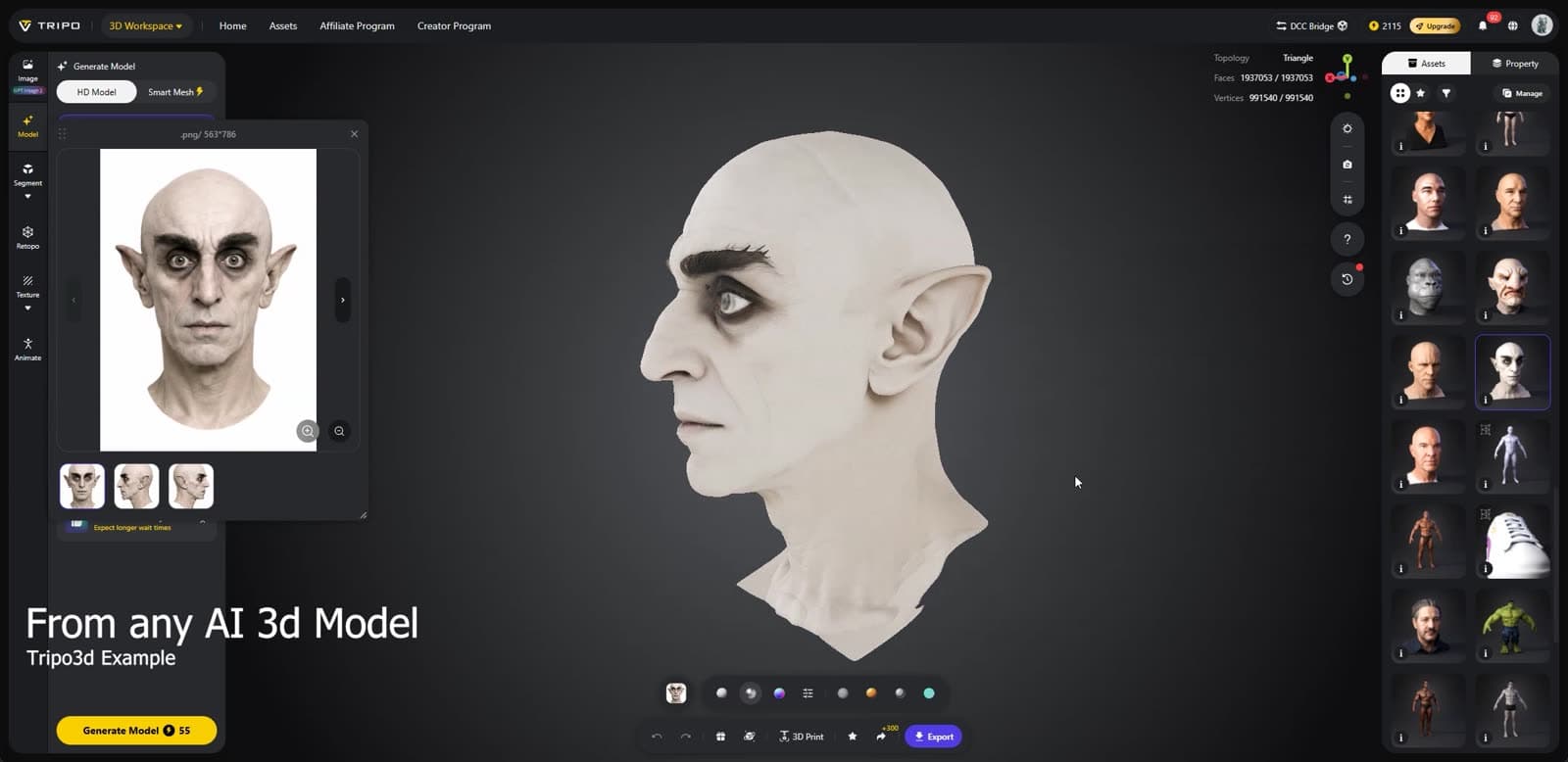
One AI-generated head — from a single image, shown below — wrapped by both. Drag to compare.


Baked normals and texture transfer happen in the MetaWrap suite — Unreal's solver outputs geometry only.
Look at the ears. The Unreal Engine 5.8 solver flattens them into the skull and hands back a generic human. MetaWrap keeps them — you get an accurate wrap, then sculpt it with smart, artist-friendly tools. Stylized and exaggerated faces are where the gap is widest.
What went in
This is the head you just compared — straight out of an AI image-to-3D tool. Impressive in a render, but production exposes the problems: uncontrolled topology, buried eyelids, distorted anatomy, no rig — nothing you can animate.
MetaWrap turns that rough starting point into a controlled MetaHuman workflow, while preserving the likeness that made the original design worth using.
Any AI image-to-3D model works the same — so does any scanner, any sculpt.
Automatic where it saves time.
Editable where quality depends on judgment.
MetaWrap automates the repetitive conversion work without locking you into an arbitrary result. Use automatic landmarks when they work, correct them manually when they don't, choose the right solver, and refine the final character with dedicated sculpting tools. Your AI model is not the final character — it's the starting point you stay in control of.
The full workflow
Raw AI model → MetaWrap conversion → MetaSculpt refinement → MetaHuman in Unreal Engine
MetaWrap. Heads and full bodies. Same wrap.
Any 3D head or full-body mesh in · Instant tris-to-quad restore for MetaHuman meshes · GNM random head generator included
- 1Import an AI-generated model, scan or custom sculpt
- 2MetaWrap aligns the geometry and detects facial landmarks
- 3Review the landmarks — or correct them manually
- 4Choose the production solver, or Conservative Wrap for difficult geometry
- 5Check the likeness with the morph slider — head, then full body
- 6Push the finished character to Unreal Engine
Get in 24 hours early.
Early Access launch offer
50% off
$79 instead of the $158 standard price
Your offer code and the purchase link arrive 24 hours before everyone else.
Blender 5.0, 5.1 and 5.2 LTS · Windows
Founder Edition — one-time license
$158
USD standard price
With a Founder launch code: $79
One-time launch license. Three products.
No subscription, no upsells, no other programs to buy — everything happens in Blender.
$158 USD before any applicable VAT, GST or sales tax. An eligible Founder launch code reduces the pre-tax subtotal to $79. Stripe / Link shows the final total before payment.
Not on sale yet — launching soon. The list gets the link first.
What you get with the Founder Edition
MetaWrap
1.0Convert custom geometry to MetaHuman topology. Automatic alignment, editable landmarks and two complementary wrapping methods — speed on clean models, control on difficult subjects.
- The real MetaHuman rig — expressions and animation work out of the box
- Scans, AI-generated meshes and sculpts — the same workflow for all three
- Automatic landmarks, with manual correction whenever you want it
- Two wrap methods: the production solver, or Conservative Wrap for difficult geometry
- Texture transfer from your source mesh
- Morph slider — dial live between the base MetaHuman and your result
- Procedural Body Generator, custom-body import/export and head-to-body attach with a clean neck seam
- One click to push the result into Unreal Engine 5
MetaSculpt
includedCorrect what automation cannot understand. Refine likeness, anatomy and difficult regions directly inside Blender — an expansion of MetaWrap, it needs MetaWrap to run.
- Non-destructive Multires sculpting on the wrapped MetaHuman
- Scan detail: lifts the mid-frequency detail from your dense source — the folds and creases that 24,000 polygons cannot hold
- Access buried eyelids, ears and internal regions without redoing the wrap
- Pore and skin-grain layer, with an editable projection mask so you decide where detail lands
- Wrinkle maps per expression
- DX normal bakes for Unreal and reusable displacement-map export
- Included permanently with the Founder Edition
MetaGroom
includedComplete the character’s groom workflow inside the same production pipeline. Unreal plugin plus Blender addon.
- Push any groom from Unreal to Blender and back — no export steps in between
- Comb and modify existing grooms with Blender's own hair tools
- Or create custom grooms from zero — hair, brows, beard and more
- Proxy scalps and grooms generated for you, no manual setup
- Wardrobe components bound automatically — drag and drop in Unreal
- Included permanently with the Founder Edition

More than a download Founder role
Every license includes access to the private verified-owner community on Discord:
- Workflow tutorials
- Product updates
- Beta previews in the private Founders channel
- Technical guidance
- Feature voting
- Character showcases
- Direct discussion with the developer and other MetaWrap artists
FAQ
Does MetaWrap generate 3D models?
No. MetaWrap takes an AI-generated model, scan or custom sculpt and converts it into a controlled MetaHuman production workflow.
Is MetaWrap a one-click tool?
MetaWrap automates alignment, landmark detection and conversion, but keeps the important artistic decisions editable. Clean models move quickly through the pipeline; difficult characters remain under your control.
Is this a Blender facial-rig addon?
No. MetaWrap focuses on converting and refining custom characters for the MetaHuman pipeline in Unreal Engine. It is not a generic Blender facial rig, and it does not replace Unreal’s MetaHuman rig.
Are Epic Games or MetaHuman assets included?
No. You must obtain and use your own MetaHuman assets through Epic’s officially licensed channels. MetaWrap does not redistribute Epic proprietary content.
What type of geometry can I use?
AI-generated heads and bodies, scans, custom sculpts and other character meshes that can be aligned to the supported MetaHuman workflow.
What happens when automatic landmarks fail?
You review, correct or place landmarks manually, and you can switch to the Conservative Wrap method on difficult geometry.
Do not settle for the raw AI result.
Turn it into a character you can inspect, refine and control throughout the production pipeline.
Get early access